
JavaScript was terminated after 90 sec. timeout
If a JavaScript runs longer, the workflow is automatically stopped with the following error:
The Workflow finished with the result: Javascript was terminated after 90 sec. timeout (Javascript running longer than 90 sec. is not supported).- The limit applies to workflows that run on the server. Scripts that run in the browser are not affected.
- The limit applies to the whole run – all steps of the workflow together, not each step separately.
- The time includes waiting – for example for an external service or an AI agent to answer.
- What the workflow did before it was stopped is not undone – records it already saved stay saved. Keep this in mind before you run it again, so you do not create duplicates or send the same e-mails twice.
- On the Pro plan and higher, you can let a workflow run longer with the Server timeout setting – see Long-running workflows below.
Why it happens
A workflow usually runs too long when one run does too much work at once:
- Reading data inside a loop – for example
getData()for every record, or a lookup table read again for every record. - Saving records one by one instead of all at once.
- Loading data the script does not need – all fields instead of a few, or the whole table instead of a filtered part.
- A Foreach loop box over many records. Each record means several requests.
- Paging through a large table in small pages.
doo.table.getDatareturns only 25 records unless you setlimit, so a loop over a big table makes many requests. - Calls to slow external services – a webhook, an API, or an SFTP server that answers slowly.
- AI calls. One call of an AI agent takes several seconds.
- Large reports generated in one run.
Find the workflow that takes the longest
- Run log – open the workflow and check its run log. The newest run is first.
- Data usage – click your avatar → Data usage → Workflow time. Click the row to see the top consumers – the workflows that ran the longest today.
How to fix it
Save all records at once
// Slow – one request per record
for (const r of rows) {
    await doo.table.updateFields('orders', r.id, { state: 'done' });
}

// Fast – one request for all records
await doo.table.updateRecordsBulk('orders',
    rows.map(r => ({ id: r.id, fields: { state: 'done' } })));
For new records, use doo.table.createRecordsBulk.
Load only what you need
Filter on the server, set limit, and load only the fields you work with:
const rows = (await doo.table.getData('orders', {
    filter: 'state(eq)open',
    limit: 500,
    loadFields: ['id', 'total']
})).data;
If you only need a number, use doo.table.getCount or doo.table.getDataSummary instead of loading records.
Read lookup tables once
Read a lookup table once at the start of the run, keep it in a variable, and use it for every record.
Process large amounts in batches
When one run cannot finish all the work in 90 seconds, split it over several runs. For example, a scheduled workflow processes the first 500 unprocessed records, marks them as processed, and the next run continues with the next 500.
const batch = (await doo.table.getData('orders', {
    filter: 'processed(eq)false',
    limit: 500,
    loadFields: ['id', 'total']
})).data;

// ... do the work ...

await doo.table.updateRecordsBulk('orders',
    batch.map(r => ({ id: r.id, fields: { processed: true } })));
Split the work into several workflows
A workflow can start another workflow with doo.workflow.runWorkflow('Workflow name'). Each workflow runs separately, with its own 90 seconds. Workflows can start each other at most 5 times for one record and 50 times in one chain.
Keep AI calls few
Plan for one or two AI calls in one run. Never call an AI agent for every record in a loop – send more records in one prompt, or process them in batches.
Long-running workflows (Pro plan and higher)
On the Pro plan and higher, a workflow can run longer than 90 seconds:
- Open the workflow in the editor.
- Set Server timeout to Long-running.
- Enter the Maximum duration (seconds). The run is stopped when it takes longer.
With Normal, the 90-second limit applies.
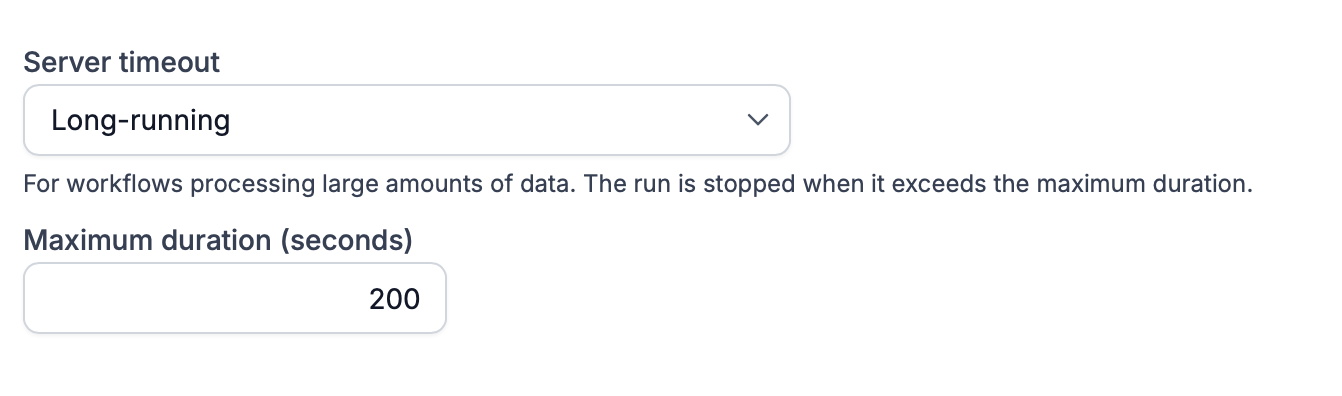
In theory, one run can use the whole daily budget of 30 minutes (1,800 seconds). The time of long-running workflows is counted in Long-running workflow time in Data usage. Like Workflow time, it is stopped at 3× the daily limit.
Even with a long-running workflow, the tips above are worth following – a faster workflow uses less of your daily budget.
Related limits
Limit | Value |
|---|---|
One run of a server workflow | 90 seconds; on Pro and higher with Server timeout → Long-running : the maximum duration you set |
Workflow time per day | 10 min (Free), 30 min (Basic, Standard, Pro), unlimited (Enterprise) |
Long-running workflow time per day | 30 min (Pro), unlimited (Enterprise) |
Workflows started by other workflows | 5 for one record, 50 in one chain |
All limits are in Limits in Tabidoo.