
Edit Records Inline
Inline Edit is a feature in Tabidoo that allows users to edit or add records directly within the table—no need to open a separate record view. With the latest improvements, inline editing now works more like Excel, making data entry faster and smoother.
Why Use It?
- Edit or create records directly inside the tables
- Perfect for quick updates and fast data entry
- Stay focused on you data without switching views
- Move through cells quickly using keyboard navigation

How to Enable It
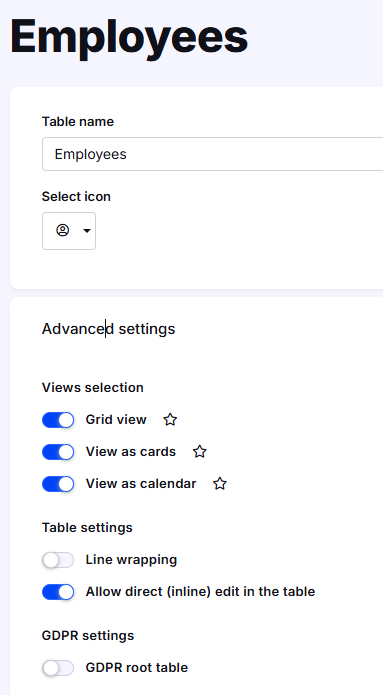
- Click the gear icon on your table
- Go to Advanced Settings
- Check “Allow direct inline edit in table”
- Save and look for the pencil icon in the bottom-right corner
New Excel-Style Editing Behavior
The inline edit experience has been improved,
- Cells no longer display edit components immediately
- You can move through the table freely and quickly
- Edit mode opens only when needed:
Press Enter
Press F2
Or simply start typing
This provides a cleaner table view and much faster editing workflow.
What You Can’t Edit Inline
Inline Edit doesn’t support these fields:
- List of checkboxes
- Free HTML
- File
- Image
- Button
Use full record view for those.
Missing the Icon?
Check that inline editing is enabled in Advanced Settings. Once active, you'll see a help article in the bottom-right corner for extra guidance.