
Exchange Rates
The Exchange Rates extension allows you to define and manage currency exchange rates, which can then be used in fields of type Money with Currency. This makes it possible to automatically work with multiple currencies in your applications.
How to Download and Install a Tabidoo Extension
There are two valid ways to open the Tabidoo Extensions catalog and install an extension into your application.
Option 1: Using Add new table
- Click Add new table in the bottom-left corner of the application.
- In the center of the screen, select Add Tabidoo extensions.
- Choose the extension you want from the catalog and add it to your application.
Option 2: Using Edit application
- Click on the application name at the top of the screen.
- From the list, select Edit application.
- Expand the Application extensions section.
- Choose and install the desired extension from the available extensions.
Both methods lead to the same extensions catalog and can be used interchangeably.
How It Works
- Activate the extension – enable Exchange Rates in your application.
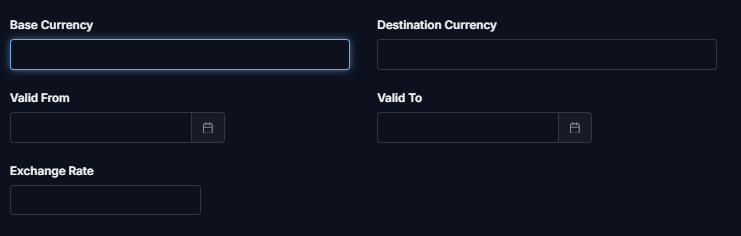
Define exchange rates – in the Exchange Rates table you can specify:
- Base currency
- Destination currency
- Valid from / Valid to (period of validity)
- Exchange rate
Use in Money with Currency fields – when creating a field of type Money with Currency, select the exchange rate provider:
- Exchange rates table (extension) – uses values from your Exchange Rates table.
- Open exchange rate driver – retrieves rates from an external provider.
Best Practices
- Keep your exchange rates up to date by setting validity periods.
- For testing or fixed conversions, you can define manual rates.
- For production use, combine with an automatic provider (e.g., open exchange rate driver) for real-time accuracy.