
DEV → TEST → PROD: Recommended Deployment Workflow
When building a larger application in Tabidoo — especially one that will evolve over time — maintaining stability, predictability, and safe development practices becomes essential.
For this reason, we recommend following the deployment workflow DEV → TEST → PROD, created by using application templates.
This structured approach reduces risks, keeps your production environment stable, and gives you full control over the evolution of your solution.
Note:
This process is recommended mainly for larger or long-term projects.
For small applications, the workflow may be unnecessary.
The method introduces additional work, but it is the safest and most controlled way to manage growing systems.
If you already have a PROD application without a DEV application, you can create DEV from PROD later, see chapter: Creating a Development App from a Production App
Always Add the System Log Extension
- For any application created through this workflow, we strongly recommend enabling the System Log extension.
This extension helps you: - Track logins and user activity – quickly see who accessed the application and when.
- Monitor server-side workflows – every background workflow execution is written here, so you can easily verify that automations are running as expected.
- Catch errors early – any errors across your applications are logged here. This allows administrators to react proactively instead of waiting for end users to report problems.
Why the DEV → TEST → PROD Process Matters
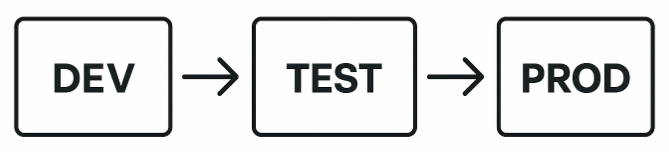
Using separate environments ensures:
- Stable operation of the production application
- Clear separation between development and live data
- A safe testing space for new features
- Better version control
- Reduced risk of breaking permissions or workflows
- Traceability, especially when System Log is enabled
If you plan to continuously expand your application, this structured workflow dramatically reduces errors.
How to Create DEV, TEST, and PROD Versions
- Start with the DEV application
Build your primary application (e.g., MyCompany).
This will become the master development version. - Publish DEV into templates
Use the “Publish to Templates” feature.
The application will appear in your Private Templates. - Download the template to create a TEST version
After downloading, rename it (e.g., MyCompany TEST).
This becomes your dedicated testing environment. - Publish the TEST application
Publish TEST into templates the same way as DEV. - Download the template to create the PROD version
Rename the downloaded version (e.g., MyCompany PROD).
This becomes your production application used by real users.
How to Recognize the “Parent” Application
The easiest way is to inspect the URL.
DEV (master) application
A true DEV application has a clean URL, for example:
https://app.tabidoo.cloud/mycompany TEST or PROD application
Any version created from a template automatically receives four additional characters, e.g.:
https://app.tabidoo.cloud/mycompany-abcd This indicates that the application is derived from the main DEV version.
Watch Out for URLs Across Environments
When working with DEV → TEST → PROD, application URLs are not fixed.
Each environment can have a different URL:
- TEST and PROD applications created from templates include a suffix
- Custom Domains completely change the base URL of the application
Because of this, hardcoded links can easily break.
Avoid hardcoded URLs
https://app.tabidoo.cloud/app/myapplication/schema/asset?recordId=${doo.model.id}
This link may work in DEV, but will break in:
- TEST / PROD (different application name or suffix)
- Custom Domain (different domain entirely)
Use dynamic environment variables
${doo.environment.domainUrl}/app/${doo.environment.currentApplication.name}/schema/asset?recordId=${doo.model.id}
This ensures the link always points to the correct environment.
Use this approach for:
- workflow emails
- notifications
- buttons linking to records
- scripts generating URLs
Important (Custom Domain)
If you switch your application to a Custom Domain, all hardcoded links will stop working.
Using doo.environment.domainUrl automatically adapts to:
- standard Tabidoo domain
- custom domains
- any environment (DEV / TEST / PROD)
Recommendation:
Always build internal links dynamically using doo.environment. This prevents broken links and ensures compatibility across all environments.
How to Distinguish TEST from PROD
Because both versions share the 4-character suffix, use the Publish to Templates settings:
- TEST is typically published, because you use it to generate the PROD version.
- PROD is usually not published, since the final environment does not need to be exported further.
This gives you a quick way to identify which environment you are working in.
How Development Should Progress
DEV (Development)
Use DEV for:
- new ideas and improvements
- implementing customer requirements
- larger structural changes
- workflow logic design
DEV may contain incomplete or experimental work.
System Log is useful here for debugging during development.
TEST (Testing)
Use TEST for:
- verifying real-world scenarios with test records
- checking permissions
- ensuring workflow and Run As behavior is correct
- preparing changes for customer review
The customer should ideally access TEST to validate new features before release.
The System Log helps you confirm that workflows behave as expected compared to DEV.
PROD (Production)
PROD contains real data and should remain stable.
Changes here should be minimal and only applied in case of urgent issues.
Always release new features through the workflow:
DEV → TEST → approval → PROD
System Log in PROD is extremely valuable for diagnosing rare or unexpected issues without interfering with live operations.
Before Each Release: Create a Snapshot
Before publishing a new version of your application, create a snapshot.
- For DEV and TEST, snapshots can contain only the definition (no data needed).
- Warning: Snapshots count towards your total Data Consumption.
Keep your pricing plan and limits in mind.
Snapshots allow you to:
- quickly restore a functional version,
- roll back if a change causes issues,
- compare behavior across environments.
Final Recommendation
For larger or long-term applications, use the structured deployment workflow:
DEV → TEST → PROD
Combine it with:
- publishing through private templates,
- enabling the System Log extension,
- creating snapshots before releases.
Although this method requires more effort, it provides the safest, most controlled, and most maintainable way to manage complex Tabidoo applications.