
API
What You Can Do with the API
Using the Tabidoo API, you can:
- read records from tables
- create and update records
- delete records
- upload attachments or images
- trigger workflows
- synchronize data with external systems
Typical integrations include:
- connecting Tabidoo with CRM or ERP systems
- synchronizing data from external applications
- triggering automation from external services
- uploading files or images to records
Quickstart Example
The easiest way to test the API is to make a request using curl or Postman.
Example request:
curl -X GET https://api.tabidoo.cloud/api/v2/table/data \
  -H "Authorization: Bearer YOUR_TOKEN"
This request retrieves records from a table.
Replace YOUR_TOKEN with your API token generated in Tabidoo.
All API requests must include the Authorization header.
Performance Recommendation
When working with larger datasets, it is recommended to use bulk operations whenever possible.
Bulk operations allow you to process multiple records in a single API request, which significantly improves performance and reduces the number of API calls.
Benefits of using bulk operations:
- faster integrations
- fewer API requests
- lower latency
- more efficient synchronization of large datasets
Whenever possible, prefer bulk endpoints instead of sending many individual requests.
Where to Find the API Section in Tabidoo
You can generate your API token in the User Settings of your account.
Steps:
- Open User Settings
- Navigate to the API section
- Generate a new token
The token will then be used in the Authorization header of API requests.
In the API section, you can see additional information for each generated token:
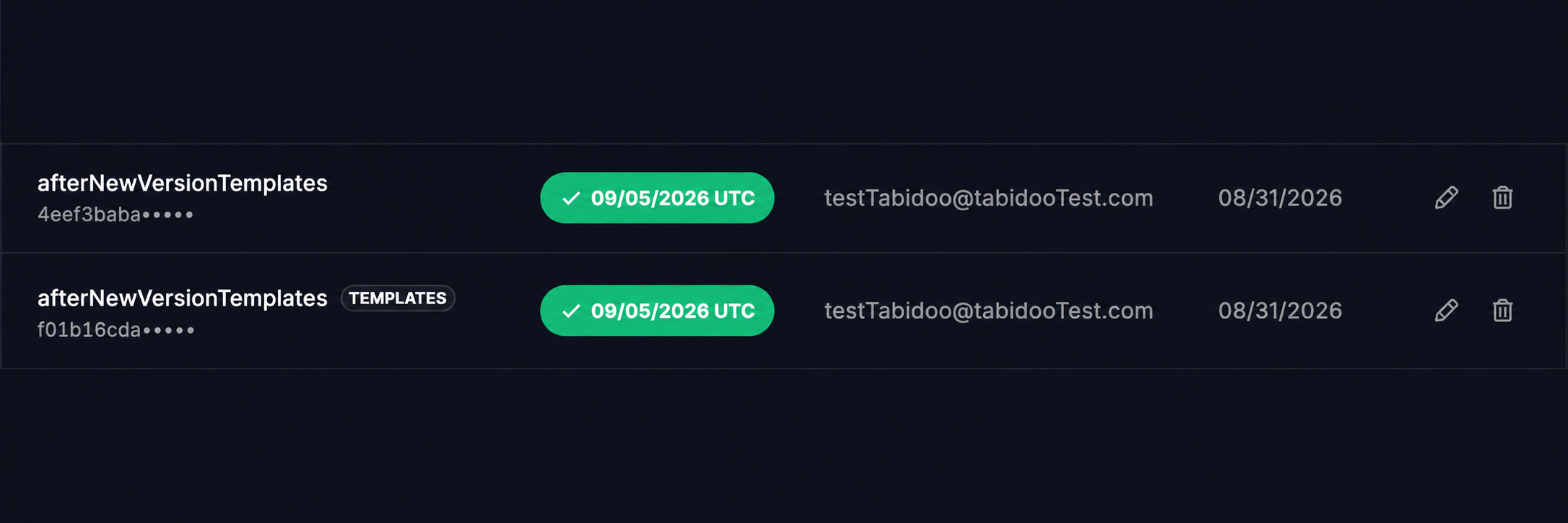
- Created by – the user who created the token
- Created on – the date when the token was created
- Status – indicates whether the token is currently valid
- Valid To – shows the expiration date, if one was specified
If an API token is used in an application template, the TEMPLATES badge is displayed next to the token name. This makes it easy to distinguish tokens used by templates from standard API tokens.
Token Types
Tabidoo provides several token types depending on the integration scenario.
Standard JWT Token
Usage: General API access for managing data, structure, users, and workflows.
Generated in:
User Settings → API section
Access level:
Equivalent to the permissions of the user who generated the token.
⚠ Treat this token like a password and keep it secure.
API Token with Assigned Role
Usage: Controlled integrations with limited permissions.
Management:
Created by administrators and assigned a specific role.
Recommended for:
- integrations
- automated scripts
- external services
Using role-based tokens limits security risks.
Short API Token
Usage: Uploading files or images (attachments, avatars, etc.).
Public Form Tokens
Usage: Public forms that allow external users to submit data.
Characteristics:
- embedded in the public form URL
- no login required
- should be used carefully
Make sure form inputs are properly validated.
Workflow Execution Tokens
Usage: Triggering workflows from external systems.
Typical scenarios:
external webhook triggers
integration platforms (Zapier, Make.com)
automated services
Using Tokens in API Calls
Every API request must include the Authorization header:
Authorization: Bearer <your-token>
Example:
curl -X GET https://api.tabidoo.cloud/api/v2/table/data \
  -H "Authorization: Bearer eyJhbGciOi..."
Always use HTTPS when communicating with the API.
Token Usage in Workflow Automation
Tokens are often used when workflows interact with external systems.
Typical scenarios include:
Load External Data
Workflows can import data from APIs, FTP servers, or shared drives using authentication tokens.
Trigger Workflow via API
External services can trigger workflow execution through HTTP requests.
Access Control
Tokens determine the permissions available to workflow actions.
Best Practices for Token Security
Follow these security guidelines when using API tokens:
- use tokens with limited roles for integrations
- store tokens in environment variables
- rotate tokens periodically
- revoke unused tokens
- never expose tokens in frontend code
- never commit tokens to public repositories
Always follow the principle of least privilege.
Example Use Cases
| Use Case | Recommended Token |
|---|---|
| Integration with external systems (Zapier, Make.com) | API Token with Role |
| Uploading attachments or images | Short API Token |
| Internal admin scripting | Standard JWT Token |
| Trigger workflow from external system | Workflow Execution Token |
Date and time handling in API
For more information about Date and time handling in API, visit "Date and time handling in workflow scripts, form scripts and API" chapter
For more information, visit Full API documentation or here Full API documentation.