
Getting Started with Extensions
Extensions in Tabidoo allow you to extend your application with additional features such as reporting, automation, monitoring, or data backups — without the need for coding.
They help you enhance functionality and gain better control over how your application behaves.
Where to Find Extensions
There are two ways to access and enable extensions in your application:
1. When Creating a New Table
- Click the “+ Add new table” button in the bottom-left corner.
- Select “Add Tabidoo extension”.
- Choose the extension you want to use.
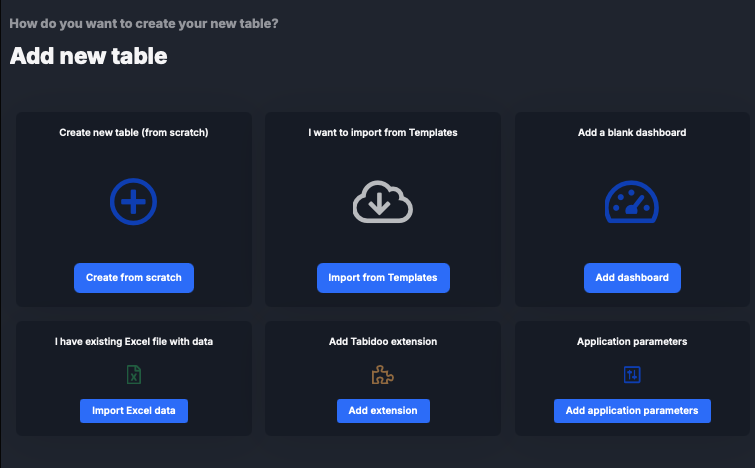
This is the fastest way to add extensions while building your application.
2. In Application Settings
- Open your application.
- Click Edit application.
- Scroll to the Application extensions section.
- Enable the extensions you want to use.
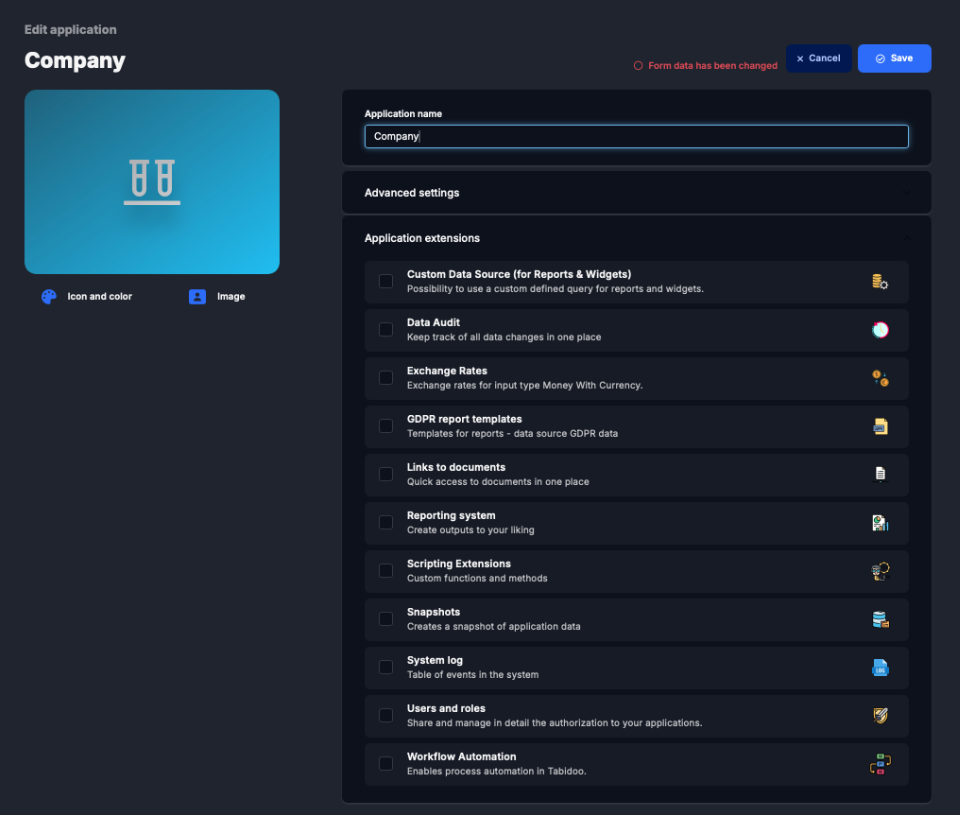
This method is useful for managing extensions in an existing application.
What Extensions Can Do
Some commonly used extensions include:
- Reporting system – create reports and outputs
- Data Audit – track changes in your data
- Workflow Automation – automate processes
- Custom Data Source – define your own queries for reports and widgets
- System Log – monitor events and application behavior
- Snapshots – create backups of your application data
Why Use Extensions
Extensions help you prevent issues and better understand what is happening in your application:
- Monitor activity using System Log
- Track changes with Data Audit
- Protect your data using Snapshots
- Reduce manual work with Workflow Automation
Using extensions gives you more control, visibility, and reliability when working with your data.