
Custom Widget
AI will extend the capabilities of the FreeHTML widget and introduce a completely new way to build dashboards and UI components in Tabidoo.
Instead of manually creating widgets, you will be able to describe what you need — and AI will generate it for you.

What will you be able to do?
With AI-powered widgets, you will be able to:
- Generate custom widgets using natural language
- Create entire dashboards in seconds
- Combine layout, logic, and presentation in one step
- Quickly prototype and adjust UI components
Example:
Create a dashboard with a summary section and a chart layout.
Generate a widget that displays key information in a clean card layout.
How it works
AI will enhance the existing Custom Widget, allowing it to:
- Generate complete widget structure
- Suggest layout and behavior
- Adapt output based on your application context
You simply describe what you want, and AI prepares the widget for you.
No-code with full flexibility
The goal is to make widget creation accessible without coding.
At the same time, you will still be able to:
- Switch to advanced mode
- Adjust the generated widget manually
- Extend behavior using scripting if needed
This makes it suitable for both non-technical users and developers.
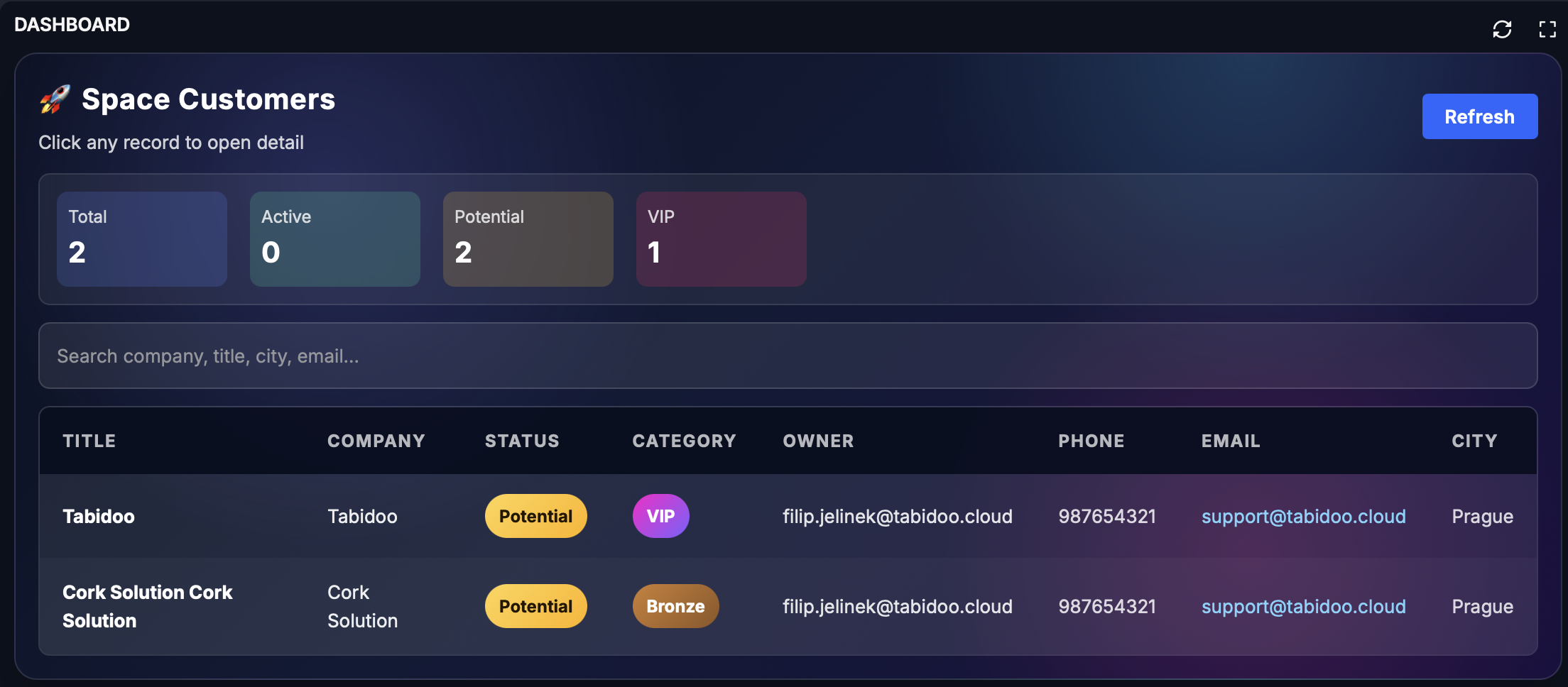
Example: Creating a dashboard with clickable records
With Tabidoo AI, you can easily create a clear dashboard based on your data. Simply enter a short prompt describing what the dashboard should include and how it should look.
Example prompt:
Create a dashboard with a clickable table of records. Make it visually clear, colorful, and modern, with a cool space and AI style.
Benefits
- No coding required for most use cases
- Faster dashboard creation
- Easy iteration and changes
- More flexibility than standard widgets